Recurring Tasks
TaskNotes recurring tasks use RFC 5545 RRule strings with DTSTART support and dynamic next-occurrence scheduling. The model separates recurrence patterns from the next planned instance.
If you are new to recurring tasks in TaskNotes, think of the recurrence rule as the long-term plan and the scheduled field as the next concrete commitment. Most day-to-day editing affects scheduled, while recurrence editing changes the plan itself.
Core Concepts
Recurring tasks operate on two independent levels:
- Recurring Pattern: Defines when pattern instances appear (controlled by
DTSTARTin the recurrence rule) - Next Occurrence: The specific date/time when you plan to work on the next instance (controlled by the
scheduledfield)
This separation lets you reschedule the next occurrence without changing the pattern.
Setting Up Recurring Tasks
In practice, setup is usually a two-step flow: choose a pattern, then check whether the next scheduled occurrence matches how you actually want to execute the next instance.
Creating Recurrence Patterns
You can create recurring tasks through:
- Recurrence Context Menu in task modals for presets or custom options
- Preset Options such as daily, weekly, or monthly
- Custom Recurrence Modal with date/time pickers and RRule configuration
Required Components
Recurring tasks require:
- Recurrence Rule: RRule string with
DTSTART - Scheduled Date: Next occurrence date (independent from the pattern)
DTSTART Integration
DTSTART is the anchor for pattern generation. It controls where the rule begins and, when time is included, the default time for future pattern instances.
- Date-only:
DTSTART:20250804;FREQ=DAILY - Date and time:
DTSTART:20250804T090000Z;FREQ=DAILY
Recurring Task Due Date
When a recurring task is completed, scheduled advances to the next occurrence. By default, due does not change.
Enable Maintain due date offset in recurring tasks in Settings → TaskNotes → Features → Recurring Tasks to preserve due/scheduled spacing.
Example:
- Scheduled:
2025-01-01 - Due:
2025-01-03 - Recurrence: weekly
If the task advances to scheduled: 2025-01-08, the due date becomes 2025-01-10 when this setting is enabled.
This setting is most useful when due dates represent a fixed lead/lag relative to scheduled work (for example, "due two days after execution"). If due dates are independent deadlines, leaving the setting off is usually clearer.
Recurrence Pattern Examples
DTSTART:20250804T090000Z;FREQ=DAILY
→ Daily at 9:00 AM, starting August 4, 2025

DTSTART:20250804T140000Z;FREQ=WEEKLY;BYDAY=MO,WE,FR
→ Monday, Wednesday, Friday at 2:00 PM, starting August 4, 2025

DTSTART:20250815;FREQ=MONTHLY;BYMONTHDAY=15
→ 15th of each month (all-day), starting August 15, 2025

DTSTART:20250801T100000Z;FREQ=MONTHLY;BYDAY=-1FR
→ Last Friday of each month at 10:00 AM, starting August 1, 2025
Dynamic Scheduled Dates
The scheduled field automatically tracks the next uncompleted occurrence:
- Initially set to the
DTSTARTdate - Advances when occurrences are completed
- Recalculates when the rule changes
- Can be manually rescheduled independently
This behavior keeps recurring tasks practical in real planning: you can preserve a stable weekly/monthly pattern while still adapting the immediate next occurrence to calendar realities.
Example Behavior
# Initial state
recurrence: "DTSTART:20250804T090000Z;FREQ=DAILY"
scheduled: "2025-08-04T09:00"
complete_instances: []

# After completing Aug 4
recurrence: "DTSTART:20250804T090000Z;FREQ=DAILY"
scheduled: "2025-08-05T09:00"
complete_instances: ["2025-08-04"]

# After manually rescheduling next occurrence
recurrence: "DTSTART:20250804T090000Z;FREQ=DAILY"
scheduled: "2025-08-05T14:30"
complete_instances: ["2025-08-04"]
Calendar Drag and Drop
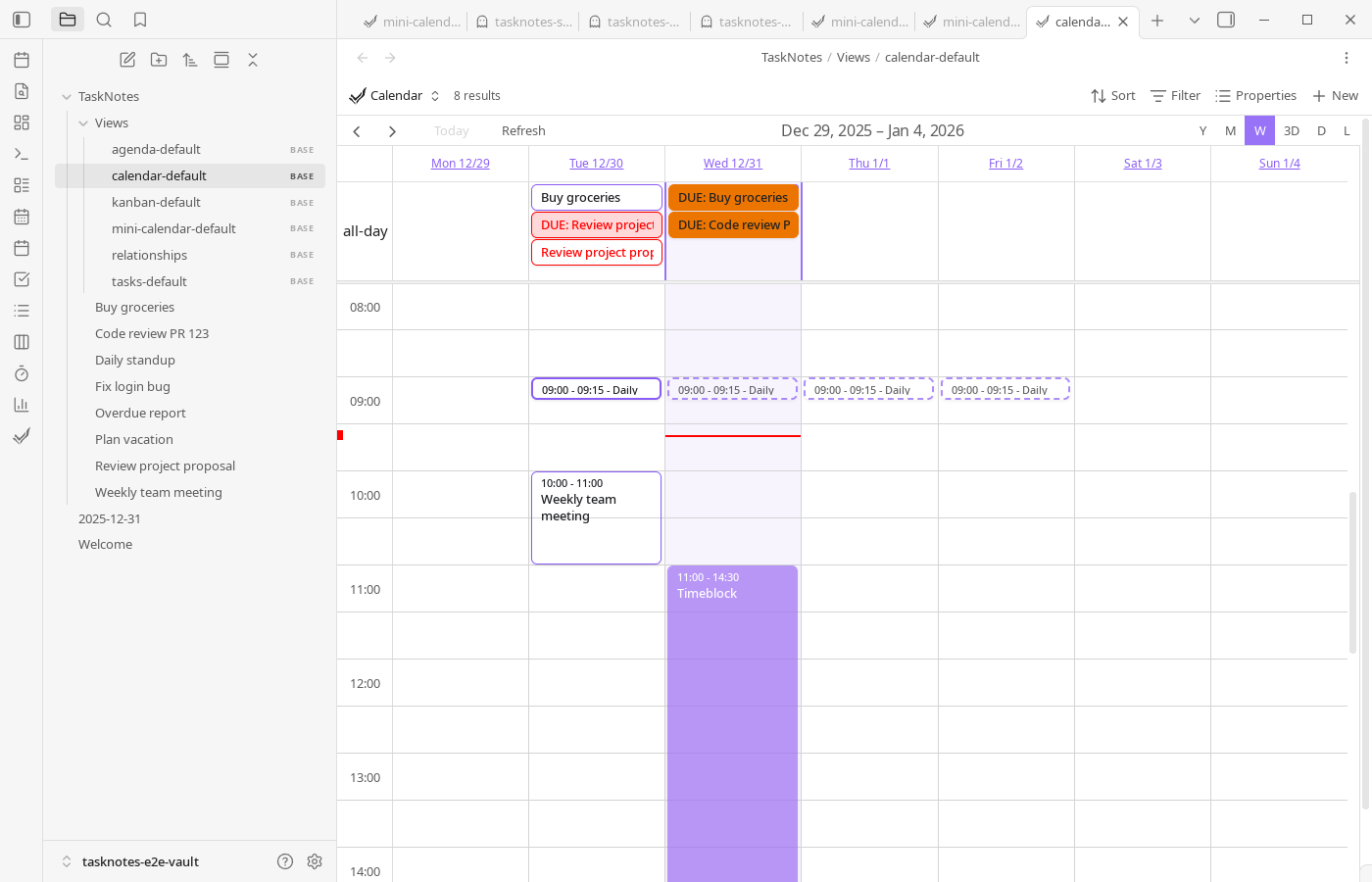
Calendar interactions follow the same model distinction: drag the concrete next item to reschedule execution, or drag a pattern instance to redefine the recurrence anchor.
Recurring tasks can show:
- Next occurrence (solid border): dragging updates only
scheduled - Pattern instances (dashed border): dragging updates
DTSTARTand future pattern instances
Completion Tracking
Each occurrence can be completed independently (task cards, calendar menus, task edit modal completion calendar).
Completed instances are stored in:
complete_instances: ["2025-08-04", "2025-08-06", "2025-08-08"]
When completion changes, scheduled updates to the next uncompleted instance.
This means completion history and next-action planning stay synchronized automatically, without manually advancing recurring tasks.
Flexible Scheduling
TaskNotes intentionally allows off-pattern scheduling so recurring tasks can absorb real-world disruptions without rewriting the entire recurrence rule.
The next occurrence can be:
- Before
DTSTART - Outside the pattern day
- At a different time than pattern instances
- Far ahead while pattern continues unchanged
Examples
# Early start before DTSTART
recurrence: "DTSTART:20250810T090000Z;FREQ=WEEKLY;BYDAY=MO"
scheduled: "2025-08-07T14:00"
# Off-pattern next occurrence
recurrence: "DTSTART:20250804T090000Z;FREQ=WEEKLY;BYDAY=MO"
scheduled: "2025-08-06T15:30"
Timezone Handling
Recurring task logic uses a UTC anchor approach:
- Pattern generation uses UTC dates
DTSTARTdates are interpreted as UTC anchors- Display adapts to local timezone
- Prevents common off-by-one date issues
In other words, calculations stay stable internally while display remains local, which avoids drift when traveling or sharing vaults across timezones.
Backward Compatibility
Recurring behavior remains compatible with older task data, so upgrades do not require manual note rewrites.
- Legacy RRule strings without
DTSTARTcontinue to work usingscheduledas anchor - Legacy recurrence objects are converted to RRule format
- Existing tasks continue to function without migration steps
- Mixed formats are handled transparently